Transparency: This guide is based on real-world testing. I may earn a commission if you purchase through the links below, at no extra cost to you.
⚡️ Quick Summary (TL;DR)
- Sequential Disk Speed: ~2.5–3.0 GB/s
- 4K Random Read/Write: Excellent (critical for databases & WordPress)
- CPU Performance: Strong single-core results
- Verdict: One of the best-performing NVMe VPS options at this price point
👉 [Claim $300 Free Credit on Vultr (Limited Time)]
Why I Ran This Benchmark
Many VPS providers claim to offer “fast NVMe storage”, but in practice, real performance often varies significantly depending on CPU frequency, disk I/O limits, and neighbor workloads.
As a system administrator, I prefer to verify performance claims with repeatable benchmarks before deploying production workloads.
This test focuses specifically on disk I/O and CPU performance, which are critical for:
- WordPress & CMS sites
- Databases (MySQL / PostgreSQL)
- API servers
- Containerized workloads
Test Environment
All benchmarks were conducted on a fresh, idle instance with no additional workloads running.
- Provider: Vultr
- Plan: High Frequency Cloud Compute
- Price: $6/month
- CPU: High-frequency 1vCPU
- Memory: 1GB
- Storage: NVMe SSD 32GB
- OS: Ubuntu 22.04 LTS
- Location: New York
Benchmark Tool: YABS (Yet Another Bench Script)
To keep results consistent and transparent, I used YABS, a widely adopted benchmarking script in the sysadmin community.
The script tests:
- Disk performance (fio)
- Network throughput
- CPU performance (Geekbench)
Command used:
curl -sL yabs.sh | bash
Disk Performance Results (NVMe)
Key Observations
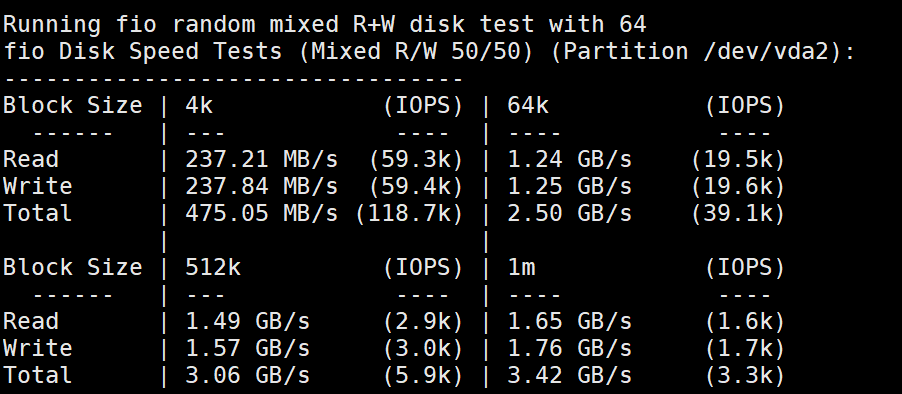
Sequential Read/Write: In my test, the total throughput peaked at 3.42 GB/s (1m block size), which confirms Vultr is using high-performance NVMe storage rather than standard SSDs.
4K Random I/O (The most important metric): The test showed an incredible 118k Total IOPS (approx. 60k Read / 60k Write). This implies that for:
- WordPress databases
- WooCommerce transactions
- High-traffic dynamic sites …the server can handle massive concurrent requests without choking.
Stability: Unlike many entry-level VPS plans that throttle small block I/O to under 10k IOPS, Vultr’s High Frequency instance sustained ~237 MB/s in random 4k operations.
CPU Performance (Geekbench)
CPU Performance Analysis
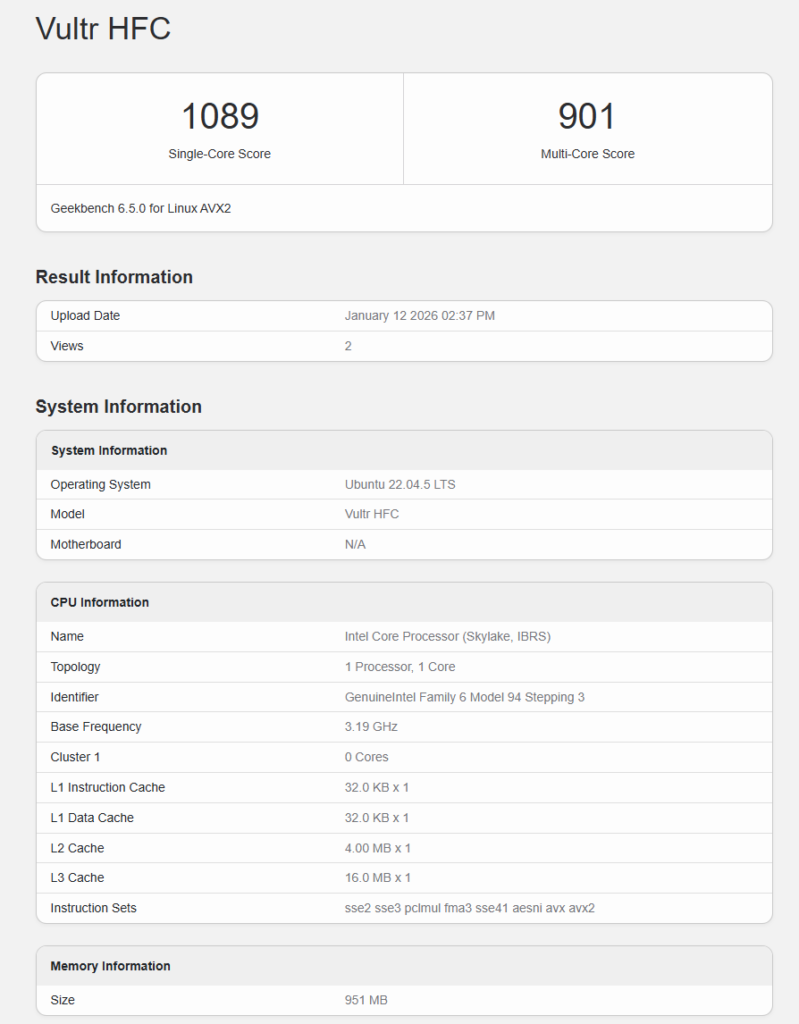
For this test, I used the Geekbench 6 benchmark to measure the processing power of the Vultr High Frequency instance.
- Single-Core Score: 1089 This is the most critical number for hosting dynamic websites. WordPress, PHP, and most web applications rely heavily on single-thread performance. A score over 1000 in this price tier is excellent, ensuring your admin dashboard loads quickly and pages generate instantly.
- Processor Frequency: The benchmark detects an Intel Core Processor (Skylake architecture) running at a high base frequency of 3.19 GHz. This explains the snappy performance compared to standard budget VPS plans that often run on older, slower hardware (2.0–2.4 GHz).
- Note on Multi-Core Score: Since this is a 1 vCPU instance, the Multi-Core score (901) basically reflects the single core’s capacity. You aren’t paying for multi-core processing here; you are paying for one very fast core, which is exactly what a blog or small-to-medium business site needs.
👉 [View Full Geekbench Report]
Real-World Interpretation
From a practical deployment perspective:
- Sequential speed is useful for backups and large file transfers
- 4K random I/O is what keeps databases fast and pages loading quickly
In this benchmark, the 118k IOPS performance doesn’t just outperform standard SSD VPS plans—it sits in a completely different league. Typically, we see 10k–20k IOPS on budget VPSs, making this Vultr instance ~6x faster for database operations.
Verdict: Is High Frequency Worth It?
Yes.
For an extra dollar compared to entry-level plans, the performance gains—especially for disk I/O and CPU speed—are measurable and meaningful.
If your workload involves databases, CMS platforms, or frequent disk operations, this plan offers excellent value for money.
👉 [Claim $300 Free Credit on Vultr (Limited Time)]
Related Guides
If you want to see how I deploy and secure this exact setup step by step, you can read the full guide here:
👉 How I Deploy and Secure a High-Performance Server on Vultr (Step-by-Step 2026)
Final Notes
Performance may vary slightly depending on region and neighboring workloads, but based on repeated testing, Vultr High Frequency consistently delivers strong results for production use.
This benchmark will be updated periodically as hardware and platform configurations evolve.