Deploying a high-performance server on Vultr is the first step. Securing it with SSH hardening and a VPN is the second. But how do you know if your website or application is truly accessible to users in London, Tokyo, or New York without any regional blocks?
Standard VPNs use datacenter IPs which are often flagged by advanced firewalls (WAFs). To be clear, VPNs are still perfect for server management and personal privacy — I use NordVPN daily for my SSH sessions. Residential proxies solve a different problem: seeing the web exactly as a normal household user.
Today, I’m walking through why IPRoyal is my go-to tool for global connectivity testing and network debugging.
What Makes IPRoyal Different?
Most proxy providers force you into expensive monthly subscriptions. As someone who manages infrastructure, I prefer tools that are as flexible as my servers.
- Non-Expiring Data: This is the killer feature. You buy a plan (starting at 1GB), and the data never expires. You use it only when you need to test a server.
- 195+ Countries & ISP Targeting: Whether you need to test from a specific city or a specific residential ISP, they have the coverage.
- High Trust Score: These are real home IP addresses. They don’t get blocked by Cloudflare’s “Under Attack” mode like server IPs often do.
Use Case: Testing Your Vultr Deployment
I use IPRoyal to verify the global routing and firewall rules of my Vultr instances. By rotating through different residential IPs, I can confirm:
- Geo-blocking & WAF Issues: I once had a test site that loaded fine via VPN but returned a Cloudflare challenge page when accessed from a real residential IP in the UK. Without a proxy, I would have never known my real users were struggling.
- CDN Performance: Is my content actually being cached and delivered fast to US-based home users?
- UFW Rule Verification: Ensuring my firewall doesn’t accidentally drop legitimate residential traffic from certain regions.
How to Set Up IPRoyal for Testing
Step 1: Choose Your Proxy Type For SysAdmin tasks, I recommend “Residential Proxies”. In the dashboard, you can select the specific country you want to simulate.
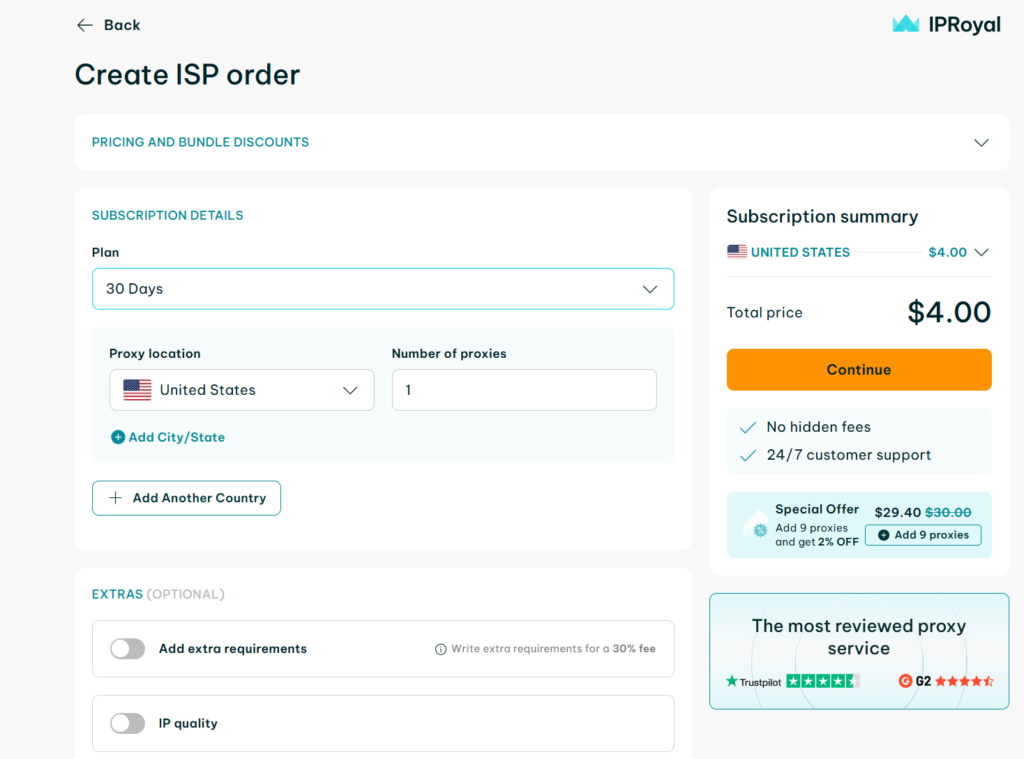
“In the IPRoyal dashboard, you can select the exact country and plan. For server debugging, a single US-based residential proxy is often all you need to start.”
Step 2: Generate Credentials IPRoyal provides a simple Username:Password format. You can use these in your browser or via curl for automation: curl -x http://username:password@link.iproyal.com:12345 http://ifconfig.me
👉 [Check IPRoyal Residential Proxy Features & Pricing]
Step 3: Verify the Connection
Once you have configured your browser or tool with the proxy credentials, it is crucial to verify that you really appear as a residential user. I use Whoer.net for this check because it gives a detailed trust score.
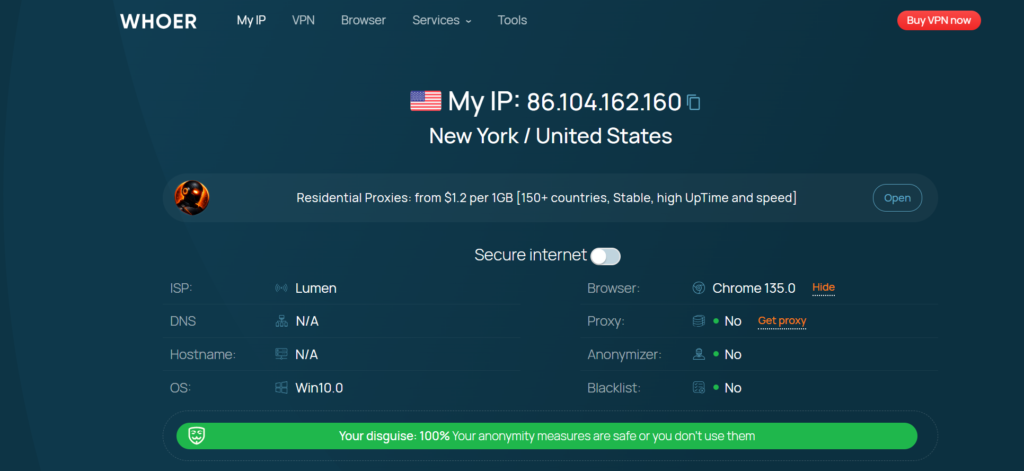
As you can see in the screenshot above, my IP is now successfully relocated to New York, and the ISP is identified as Lumen (a real residential provider, not a datacenter). Most importantly, the 100% disguise score confirms that the proxy is completely undetectable.
Final Verdict
If you only need basic anonymity or secure server access, a VPN is enough. However, if you need to test exactly what real users see across different regions, residential proxies are non-negotiable.
IPRoyal bridges the gap between your server’s backend performance and the end-user’s actual experience.